

Operator panel
One place to report, report and observe the work of the post.
Breakdown reported immediately - quick response, efficient service
Fault reporting is quick and intuitive — the operator selects the incident category and the system automatically forwards the information to the appropriate persons. Notifications are sent immediately, enabling a rapid response and limiting losses. The solution eliminates delays resulting from manual information flow, ensuring full transparency of the process.
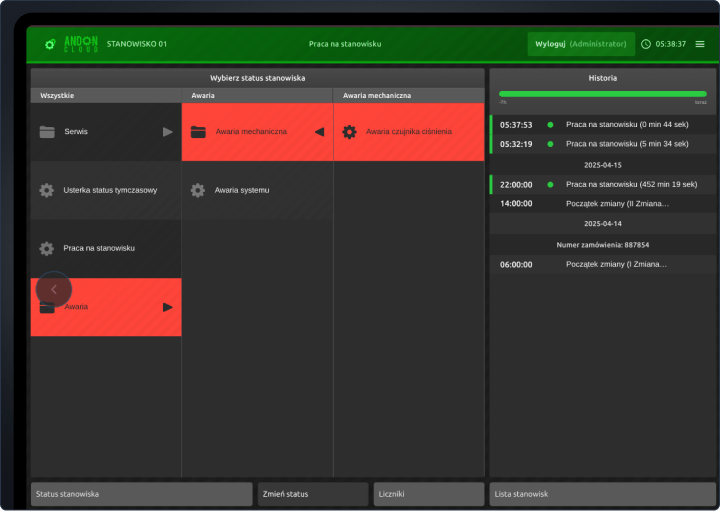
Report an emergency with one click
The operator reports the failure by selecting one option from the list, without the need for additional descriptions. The simplified process reduces the number of errors and shortens the response time to incidents.
Automatic notifications
The system automatically forwards the report to the appropriate department according to defined rules. This ensures that it is immediately forwarded to the persons responsible for taking action.
Instant notifications
Failure information is sent in real time via e-mail, SMS or voice signal. This allows the team to respond without delay and minimise the risk of prolonged downtime.
Order management - tailored to operational conditions
Production order management in AndonCloud is flexible and intuitive. It allows you to efficiently start, pause or complete work on an order — both according to plan and in manual mode. Operators have quick access to current tasks, which streamlines production organisation. The entire process is transparent and flexible, making it easy to adapt to changing operating conditions.
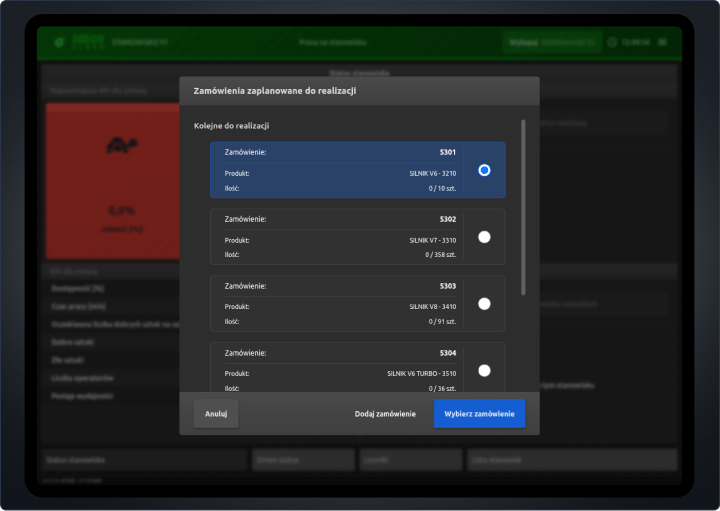
Starting an order without looking for a plan
The operator can see the current list of orders and immediately select the appropriate task. This eliminates the time needed to search for documentation or plans.
Manual or scheduled mode
Orders can be launched according to a schedule or manually, depending on the situation in the hall. The system automatically adjusts its operation to the selected mode.
Automatic or manual termination
The order ends automatically once the production target has been reached, or it can be closed manually by the operator. If necessary, work can continue without reconfiguration.
Modern work records - fewer clicks, more efficiency
The registration of work start and end times has been simplified to minimise the number of steps required by the operator. The system helps to reduce reporting time and increases the transparency of work data. The intuitive interface makes the entire process quick and requires minimal handling.
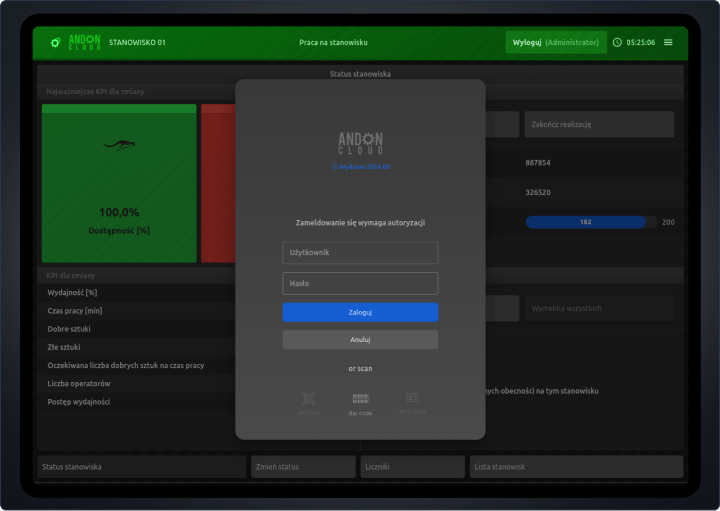
Simple shift reporting
The change is recorded with a single click, eliminating the need to fill in forms manually. This saves time and reduces the risk of errors.
Accessibility from anywhere
The reporting panel works on any device, allowing operators to submit reports without having to return to the office. This supports smooth operation on the shop floor.
Synchronize data
Production data is updated automatically and immediately available to supervisors. This ensures that the team always works with up-to-date information.
Data from the hall in one place - automatically and in real time
The operator panel integrates data from machines, sensors and external systems, eliminating the need for manual entry of most information. Automatic data collection speeds up operators' work and reduces errors. The system ensures consistency and a complete history of activity at the workstation.
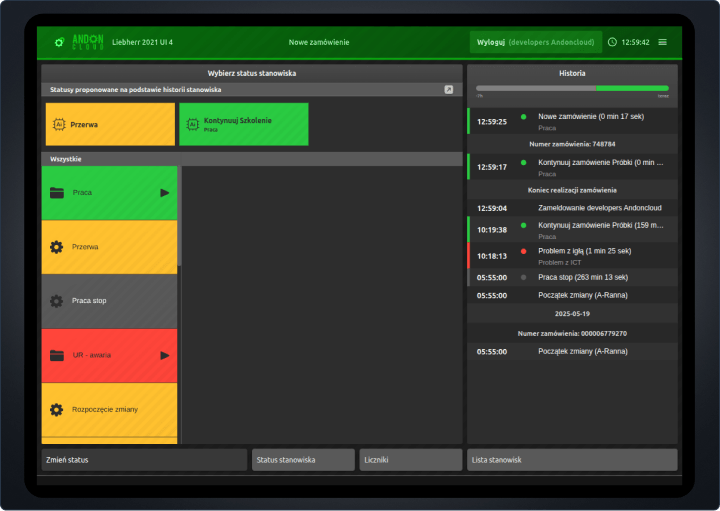
Integration of sensor data and operator actions
The operator only enters key information, while the rest of the data is automatically retrieved from machines and sensors. This makes production recording faster, more accurate and significantly reduces the workload for operators.
Full history of interventions
Each step in the handling of a defect - report, repair, comments - is recorded with an assignment to a specific user, which increases accountability and facilitates later analysis.
Connection to production systems
The operator panel can be integrated with company systems – data can be transferred automatically. This means that information is transferred without the operator's involvement. The whole process is fast and requires no additional steps.
System
Our system is intuitive, but you can always count on us
We help your team work more efficiently every day.
Documentation
Customer support
Integrations
FAQ
Frequently asked questions
- With one click - the system records the time and assigns the operator to the change.
- Yes - the status is visible on the panel and marked with a color.
- Yes - each status can be assigned a note or description.
- Yes - each report is identified by user and time.
- Some of the statuses can be triggered manually, some - by a sensor or the system.
- Clicking “Execute order” - selects from the list or adds a new one, if he has the authority.
- Yes - when the production target is reached. But you can also terminate or pause manually.
- Yes - the system does not block further work, the data is saved and visible in reports.
- Yes - it sees only those assigned to a position, which reduces the risk of mistakes.
- Yes - the production progress will be counted in total, and the status will be visible everywhere in real time.
- The system displays a message and will not allow you to start a new order without closing the previous one.
- Yes - if the mode of operation and the role of the operator allows it. You can operate with full flexibility.
- To the assigned UR team - depending on the configuration.
- The panel can show the status of the request and the assigned person.
- Mail, SMS and voice notifications - configurable by the administrator.
- MES, ERP, quality control systems and many others.
- Yes - the panel updates the data in real time.
- Yes - for example, the status “work” will appear when the machine is started.
- Yes - but in a different form (dashboard, report), with more scope.
Contact
Contact us
If you have any questions, talk to our expert
We will respond within the next business day
sales@andoncloud.comPhone
Monday - Friday; 9:00 - 17:00
+48 71 340 70 15
Marcin Wierzbicki
During the meeting, we will present the product and help you configure the system in your company efficiently and quickly. Our team is at your disposal.
Newsletter
Sign up for the newsletter
Want to stay up to date? Sign up for our database.
By subscribing to our newsletter, you agree to our Privacy Policy and to receive updates from our company.